
(This article was originally published at The DO Loop, and syndicated at StatsBlogs.)
A common visualization is to compare characteristics of two groups. This article emphasizes two tips that will help make the comparison clear. First, consider graphing the differences between the groups. Second, in any plot that has a categorical axis, sort the categories by a meaningful quantity.
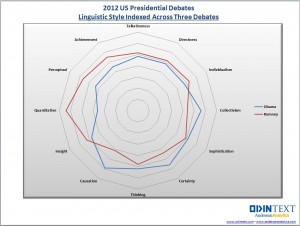
This article is motivated by a radar plot that compares the performance of Barak Obama and Mitt Romney in the 2012 US presidential debates. The radar plot (shown at left) displays 12 characteristics of the candidates' words during the debates. Characteristics included "directness", "talkativeness", and "sophistication." The radar chart accompanies an interesting article about using text analytics to investigate the candidates' styles and performance during the debates.
Unfortunately, I found it difficult to use the radar chart to compare the candidates. I wondered whether a simpler chart might be more effective. I couldn't find the exact numbers used to create the radar chart, but I could use the radar chart to estimate the values. The following DATA step defines the data. The numbers seem to be the relative percentages that each candidate displayed a given characteristic. (Possibly weighted by the amount of time that each candidate spoke?) Each row adds to 100%. For example, of the words and phrases that were classified as exhibiting "individualism," 47% of the phrases were uttered by Obama, and 53% by Romney.
data Debate2012;
input Category $15. Obama Romney;
datalines;
Individualism  47 53
Directness     49 51
Talkativeness  49 51
Achievement    45 55
Perceptual     44 56
Quantitative   36 64
Insight        47 53
Causation      59 41
Thinking       52 48
Certainty      56 44
Sophistication 51 49
Collectivism   56 44
;
You can use the data in this form to display a series plot (line plot) of the percentages versus the categories, but the main visual impact of the line plot is that Obama's values are low when Romney's are high, and vice versa. Since that is just a consequence of the fact that the percentages add to 100%, I do not display the series plot.
To display a bar chart, you can create a grouping variable with the values "Obama" and "Romney." You can then use the GROUP= option on the HBAR statement in PROC SGPLOT to create the following stacked bar chart:
data Long;        /* transpose the data from wide to long */
set Debate2012;
Candidate = "Obama "; Value = Obama;  output;
Candidate = "Romney"; Value = Romney; output;
drop Obama Romney;
run;

title "2012 US Presidential Debates";
title2 "Linguistic Style Indexed Across Three Debates";
footnote justify=left "Data from http://blog.odintext.com/?p=179";
proc sgplot data=Long;
   hbar Category / response=Value group=Candidate groupdisplay=stack;
   refline 50 / axis=x lineattrs=(color=black);
   yaxis discreteorder=data;
   xaxis label="Percentage" values=(0 to 100 by 10);
run;
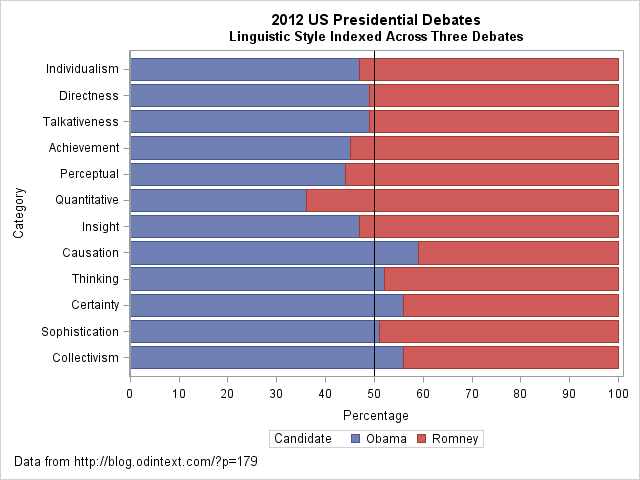
The stacked bar chart makes it easy to compare the styles of the two candidates. In some categories (directness, talkativeness, and sophistication), the candidates are similar. In others (quantitative, causation), the candidates differ more dramatically. A prominent reference line at 50% provides a useful dividing line for comparing the candidates' styles.
However, I see two problems with the stacked bar chart. First, the categories do not seem to be sorted in any useful order. (This order was used for the radar chart.) Second, I often find that if you want to contrast two groups, it often makes sense to plot the difference between the groups, rather than the absolute quantities. This results in the following changes:- The reference line becomes zero, which represents no difference.
- The chart can use a smaller scale, so that it is easier to see small differences.
- You can sort the categories by the difference, so that the order of the categories becomes useful.
- The difference is a single quantity, which is easier to visualize than two categories. (Although, since the percentages sum to 100%, there is only one independent quantity no matter how you visualize the data.)
The following DATA step uses the original data to compute the percentage difference between the candidates for each style category. Although it is not necessary to use two colors to visualize a single quantity, in US politics it is a convention to use red to represent Republicans (Romney) and blue to represent Democrats (Obama).
data DebateDiff;
set Debate2012;
label Difference = "Percentage Difference: Romney - Obama";
Difference = Romney - Obama;
if Difference>0 then Advantage = "Romney";
else                 Advantage = "Obama ";
run;

proc sort data=DebateDiff;  /* sort categories by difference */
   by Difference;
run;

title2 "Linguistic Style Differences Indexed Across Three Debates";
proc sgplot data=DebateDiff;
   hbar Category / response=Difference group=Advantage;
   refline 0 / axis=x;
   yaxis discreteorder=data;
   xaxis grid;
   keylegend / position=topright location=inside title="Candidate" across=1;
run;
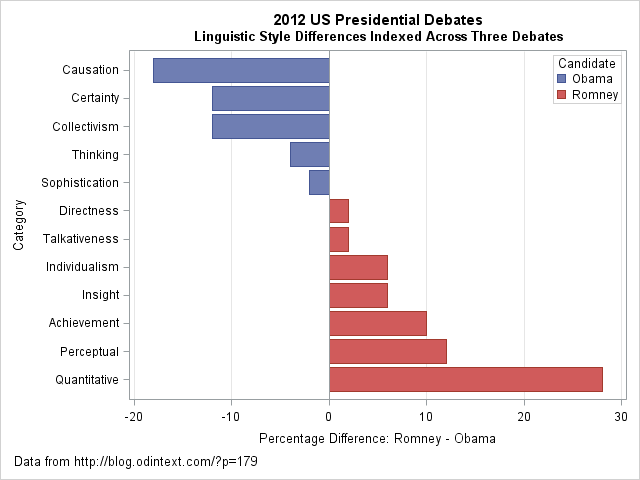
I think that the "difference plot" is superior to the original radar chart and to the stacked bar chart. It makes a clear contrast of the candidates' styles. You can clearly see that Obama's words evoked causation, certainty, and collectivism much more than Romney's did. In contrast, Romney's words were perceptual and quantitative more often than Obama's. In a statistical analysis that includes uncertainties, you could even include a margin of error on this chart. For example, it might be the case that the candidates' styles were not significantly different for the sophistication, directness, and talkativeness categories. If so, those bars might be colored white or grey.
Although radar charts are useful for plotting periodic categories such as months and wind directions, I think a simple bar chart is more effective for this analysis. The main idea that I want to convey is that if you want to contrast two groups, consider displaying the difference between the groups. Also, order categories in a meaningful way, rather than default to an arbitrary order such as alphabetical order. By using these two simple tips, you can create a graph that makes a clear comparison between two groups.
What do you think? For these data, which plot would you choose to display differences between the candidates?
Please comment on the article here: The DO Loop
