
(This article was originally published at The Analysis Factor, and syndicated at StatsBlogs.)
by David Lillis, Phd.
In Part 2 of this series, we created two variables and used the lm() command to perform a least squares regression on them, treating one of them as the dependent variable and the other as the independent variable. Here they are again.
height = c(176, 154, 138, 196, 132, 176, 181, 169, 150, 175)
weight = c(82, 49, 53, 112, 47, 69, 77, 71, 62, 78)
Today we learn how to obtain useful diagnostic information about a regression model and then how to draw residuals on a plot. As before, we perform the regression.
lm(height ~ weight)
Call:
lm(formula = height ~ weight)
Coefficients:
(Intercept) weight
98.0054 0.9528
Now let’s find out more about the regression. First, let’s store the regression model as an object called mod and then use the summary() command to learn about the regression.
mod <- lm(height ~ weight)
summary(mod)
Here is what R gives you.
Call:
lm(formula = height ~ weight)
Residuals:
Min 1Q Median 3Q Max
-10.786 -8.307 1.272 7.818 12.253
Coefficients:
Estimate Std. Error t value Pr(>|t|)
(Intercept) 98.0054 11.7053 8.373 3.14e-05 ***
weight 0.9528 0.1618 5.889 0.000366 ***
---
Signif. codes: 0 ‘***’ 0.001 ‘**’ 0.01 ‘*’ 0.05 ‘.’ 0.1 ‘ ’ 1
Residual standard error: 9.358 on 8 degrees of freedom
Multiple R-squared: 0.8126, Adjusted R-squared: 0.7891
F-statistic: 34.68 on 1 and 8 DF, p-value: 0.0003662
R has given you a great deal of diagnostic information about the regression. The most useful of this information are the coefficients themselves, the Adjusted R-squared, the F-statistic and the p-value for the model. I imagine that you know what these diagnostics mean.
Now let’s use R’s predict() command to create a vector of fitted values
regmodel <- predict(lm(height ~ weight))
regmodel
Here are the fitted values:
1 2 3 4 5
176.1334 144.6916 148.5027 204.7167 142.7861
6 7 8 9 10
163.7472 171.3695 165.6528 157.0778 172.3222
Now let’s plot the data and regression line again.
[Note: R is very picky about the quotation marks you use. If the font that is displaying this post shows the beginning and ending quotation marks as facing in different directions, it won't work in R. They both have to look the same--just straight lines. You may have to retype them within R rather than cutting and pasting.]
plot(weight, height, pch = 16, cex = 1.3, col = "red", main = "MY FIRST PLOT USING R", xlab = "WEIGHT (kg)", ylab = "HEIGHT (cm)")

abline(98.0054, 0.9528)
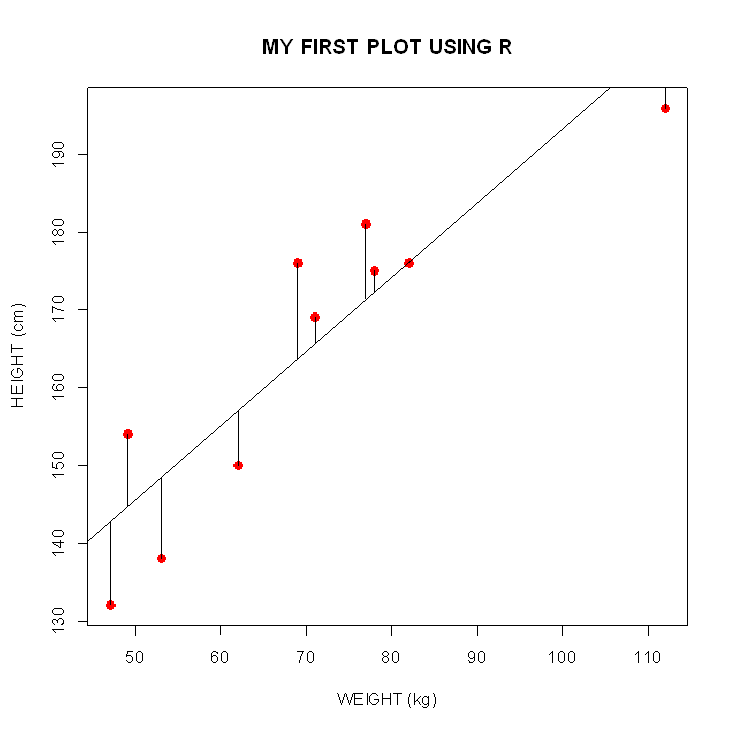
We can plot the residuals using R’s for loop and a subscript k that runs from 1 to the number of data points. We know that there are 10 data points, but if we do not know the number of data we can find it using the length() command on either the height or weight variable.
npoints <- length(weight)
npoints
[1] 10
Now let’s implement the loop and draw the residuals using the lines() command. Note the syntax we use to draw in the residuals.
for (k in 1: npoints) lines(c(weight[k], weight[k]), c(height[k], regmodel[k]))
Here is our plot, including the residuals.
None of this was so difficult!
In Part 4 we will look at more advanced aspects of regression models and see what R has to offer.
About the Author: David Lillis has taught R to many researchers and statisticians. His company, Sigma Statistics and Research Limited, provides both on-line instruction and face-to-face workshops on R, and coding services in R. David holds a doctorate in applied statistics.

Like this post?
Please comment on the article here: The Analysis Factor

