
(This article was originally published at The DO Loop, and syndicated at StatsBlogs.)
A reader asked:
I want to create a vector as follows. Suppose there are two given vectors x=[A B C] and f=[1 2 3]. Here f indicates the frequency vector. I hope to generate a vector c=[A B B C C C]. I am trying to use the REPEAT function in the SAS/IML, language but there is always something wrong. Can you help me?
This is probably a good time to remind everyone about the SAS/IML Community (formerly known as a Discussion Forum). You can post your SAS/IML questions there 24 hours a day. That is always a better plan than making a personal appeal to me, because I receive dozens of questions like this every month, and there is no way that I can personally reply. There are lots of experienced SAS/IML experts out there, so please use the SAS/IML Community to tap into that knowledge.
That said, I think the answer to this reader's question makes an interesting example of statistical programming with SAS/IML software. It is trivial to solve this in the DATA step (see the end of this article), but how might you solve it in the SAS/IML language? If you'd like to try to solve this problem yourself, stop reading here. Spoilers ahead!
Create a new vector that duplicates frequencies
The goal is to write a function that duplicates or "expands" data that have a frequency variable. The important function to use for this task is the CUSUM function, which computes the cumulative frequencies. Let's look at a simple example and apply the CUSUM function to the frequency vector:
proc iml;
values={A,B,C,E};
freq = {2,1,3,4};
cumfreq = cusum(freq);
print values freq cumfreq;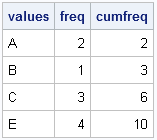
As shown in the output, the cumfreq variable contains the indices for the expanded data. The expanded data will be a vector that contains 10 elements. The first data value (A) repeats twice (the freq value), so it repeats until element 2 (the cumfreq value) in the expanded vector. The second category fills element 3. The next category repeats 3 times, so it occupies up through element 6 in the expanded vector. The last category repeats until element 10. The following DO loop specifies each data value and the indices of the expanded vector that it should occupy:
print (values[1])[label="value"] (1:cumFreq[1])[label="Indices"];
do i = 2 to nrow(values);
   bIdx = 1 + cumFreq[i-1]; /* begin index */
   eIdx = cumFreq[i];       /* end index */
   value = values[i];
   print value (bIdx:eIdx)[label="Indices"];
end;
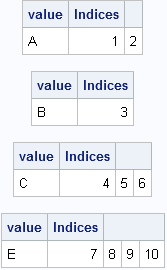
The output shows that we have all the information we need to allocate a vector of length 10 and fill it with the data values, where the ith value is repeated freq[i] times. The key, it turns out, is to use the CUSUM function to find the indices that correspond to the each data value.
A module to compute the expanded data
In SAS procedures that support a FREQ statement, the frequency values must be positive integers. If the frequency value is missing or is a nonpositive value, the corresponding data value is excluded from the analysis. It is easy to add that same feature to a module that takes a vector of values and a vector of frequencies and returns a vector that contains the data in expanded form. This is implemented in the following SAS/IML module, which allocates the result vector with the first data value in order to avoid handling the first element outside of the DO loop:
start expandFreq(_x, _freq);
   /* Optional: handle nonpositive and fractional frequencies */
   idx = loc(_freq > 0); /* trick: in SAS this also handles missing alues */
   if ncol(idx)=0 then return (.);
   x = _x[idx];
   freq = round( _freq[idx] );

   /* all frequencies are now positive integers */
   cumfreq = cusum(freq);

   /* Initialize result with x[1] to get correct char/num type */
   N = nrow(x);
   expand = j(cumfreq[N], 1, x[1]); /* useful trick */

   do i = 2 to N;
      bIdx = 1 + cumFreq[i-1]; /* begin index */
      eIdx = cumFreq[i];       /* end index */
      expand[bIdx:eIdx] = x[i];/* you could use the REPEAT function here */
   end;
   return ( expand );
finish;

/* test the module */
values={A,B,C,D,E,F};
freq = {2,1,3,0,4,.}; /* include nonpositive and missing frequencies */
y = expandFreq(values, freq);
print values freq y;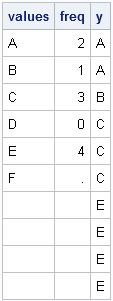
Notice that you don't actually need to use the REPEAT function because SAS/IML is happy to assign a scalar value into a vector. The scalar is automatically repeated as often as needed in order to fill the vector.
A DATA step solution
As indicated at the beginning of this post, the DATA step solution is quite simple: merely use the OUTPUT statement in a loop, as shown in the following example:
data Orig;
input x $ Freq;
datalines;
A 2
B 1
C 3
D 0
E 4
F .
;
run;

/* expand original data by frequency variable */
data Expand;
keep x;
set Orig;
if Freq<1 then delete;
do i = 1 to int(Freq);
   output;
end;
run;
proc print data=Expand; run;
The output data set contains the same data as the y vector in the SAS/IML program.
Please comment on the article here: The DO Loop
