
(This article was originally published at The DO Loop, and syndicated at StatsBlogs.)
Last week I showed a timeline of living US presidents. The number of living presidents is constant during the time interval between inaugurations and deaths of presidents. The data was taken from a Wikipedia table (shown below) that shows the number of years and days between events. This article shows how you can use the INTCK and INTNX functions in SAS to compute the time between events in this format. In particular, I use two little-known options to these functions that make this task easy.

Intervals between dates
If you are computing the interval between two dates (a start date and an end date) there are two SAS functions that you absolutely must know about.
- The INTCK function returns the number of time units between two dates. For the time unit, you can choose years, months, weeks, days, and more. For example, in my previous article I used the INTCK function to determine the number of days between two dates.
- The INTNX function returns a SAS date that is a specified number of time units away from a specified date. For example, you can use the INTNX function to compute the date that is 308 days in the future from a given date.
These two functions complement each other: one computes the difference between two dates, the other enables you to add time units to a date value.
By default, these functions use the number of "calendar boundaries" between the dates, such as the first day of a year, month, or week. For example, if you choose to measure year intervals, the INTCK function counts how many times 01JAN occurred between the dates, and the INTNX function returns a future 01JAN date. Similarly, if you measure month intervals, the INTCK function counts how many first-of-the-months occur between two dates, and the INTNX function returns a future first-of-the-month date.
Options to compute anniversary dates
Both functions support many options to modify the default behavior. If you want to count full year intervals, instead of the number of times people celebrated New Year's Eve, these function support options (as of SAS 9.2) to count the number of "anniversaries" between two dates and to compute the date of a future anniversary. You can use the 'CONTINUOUS' option for the INTCK function and the 'SAME' option for the INTNX function, as follows:
- The 'CONTINUOUS' option in the INTCK function enables you to count the number of anniversaries of one date that occur prior to a second date. For example, the statement
Years = intck('year', '30APR1789'd, '04MAR1797'd, 'continuous');
returns the value 7 because there are 7 full years (anniversaries of 30APR) between those two dates. Without the 'CONTINUOUS' option, the function returns 8 because 01JAN occurs 8 times between those dates. - The statement
Anniv = intnx('year', '30APR1789'd, 7, 'same');
returns the 7th anniversary of the date 30APR1789. In other words, it returns the date value for 30APR1796.
The beauty of these functions is that they automatically handle leap years! If you request the number of days between two dates, the INTCK function includes leap days in the result. If an event occurs on a leap day, and you ask the INTNX function for the next anniversary of that event, you will get 28FEB of the next year, which is the most common convention for handling anniversaries of a leap day.
An algorithm to compute years and days between events
The following algorithm computes the number of years and days between dates in SAS:
- Use the INTCK function with the 'CONTINUOUS' option to compute the number of complete years between the two dates.
- Use the INTNX function to find a third date (the anniversary date) which is the same month and day as the start date, but occurs less than one year prior to the end date. (The anniversary of a leap days is either 28FEB or 29FEB, depending on whether the anniversary occurs in a leap year.)
- Use the INTCK function to compute the number of days between the anniversary date and the end date.
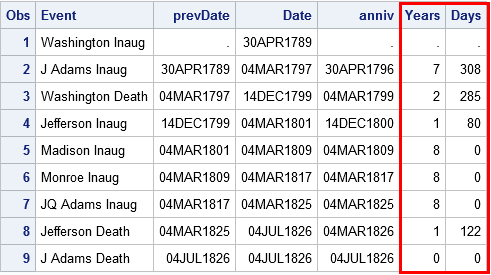
The following DATA step computes the time interval in years and days between the first few US presidential inaugurations and deaths. The resulting Year and Day variables contain the same information as is displayed in the Wikipedia table.
data YearDays; format Date prevDate anniv Date9.; input @1 Date anydtdte12. @13 Event $26.; prevDate = lag(Date); if _N_=1 then do; /* when _N_=1, lag(Date)=. */ Years=.; Days=.; return; /* set years & days, go to next obs */ end; Years = intck('year', prevDate, Date, 'continuous'); /* num complete years */ Anniv = intnx('year', prevDate, Years, 'same'); /* most recent anniv */ Days = intck('day', anniv, Date); /* days since anniv */ datalines; Apr 30, 1789 Washington Inaug Mar 4, 1797 J Adams Inaug Dec 14, 1799 Washington Death Mar 4, 1801 Jefferson Inaug Mar 4, 1809 Madison Inaug Mar 4, 1817 Monroe Inaug Mar 4, 1825 JQ Adams Inaug Jul 4, 1826 Jefferson Death Jul 4, 1826 J Adams Death run; proc print data=YearDays; var Event prevDate Date Anniv Years Days; run; |
Summary and references
In summary, the INTCK and INTNX functions are essential for computing intervals between dates. In this article, I emphasized two little-known options: the 'CONTINUOUS' option in INTCK and the 'SAME' option in INTNX. By using these options, you can to compute the number of anniversaries between dates and the most recent anniversary. Thus you can compute the years and days between two dates.
There have been countless articles and papers written about SAS dates and finding intervals between dates. I recommend the following articles:
- A brief introduction to SAS date and time functions is Andrew Karp (2003) "Working with SAS Date and Time Functions." Unfortunately, this paper was written before the 'CONTINUOUS' and 'SAME' options were added.
- I learned about the ‘SAME’ from a short paper by Bruce Gilsen (2006) "Improve Your Dating: The INTNX Function Alignment Value SAMEDAY."
- A more advanced paper with many examples, including examples of the 'CONTINUOUS' and 'SAME' options, is Derek Morgan (2015) "Demystifying Date and Time Intervals." Derek also wrote the book The Essential Guide to SAS Dates and Times (Second Edition, 2014)
Lastly, do you know what the acronyms INTCK and INTNX stand for? Obviously the 'INT' part refers to INTervals. The general consensus is that 'INTCK' stands for 'Interval Check' and 'INTNX' stands for "Interval Next."
The post INTCK and INTNX: Two essential functions for computing intervals between dates in SAS appeared first on The DO Loop.
Please comment on the article here: The DO Loop
